

Our Total Access Mobile Banking Application
Manage your money right from your smartphone with the Total Access mobile banking app, part of our digital banking services. Deposit checks with a photo, send money with Zelle®, see your full financial picture with Money Manager, and keep tabs on your credit with Credit Score Manager, all with secure biometric login.1
Everything You Need on the Device You Use Most
With our mobile banking app1, you can do everything that's available when you log in from a laptop, plus deposit checks and pay friends and family with Zelle®2. It's convenient, accessible and secure, which means you can bank when, where and how you want.


How To Get Started
- Download the app free from the Apple App Store or Google Play.
- Sign in with your online banking username and passcode, or enroll if you are new.
- Turn on Touch ID or Face ID for fast, secure access, and enable alerts to stay on top of your accounts.
Mobile check deposits submitted by 8 p.m. are typically available the next business day.

Deposit Checks with a Picture
Just got a check in the mail? Get it into your account quickly with mobile deposit. All you do is take a picture of the front and back of the check, and we do the rest. Plus, deposits made by 8:00 p.m. will be available for you the next business day. Talk about quick and simple banking. Learn more.
Send Money in the Moment with Zelle
Zelle® makes it easy to send money to, or receive money from, people you trust with a bank account in the U.S.2 Get started.
Know Your Full Financial Picture
With Money Manager, our personal financial management tool, you are just a click away from always knowing your full financial picture. Money Manager is your one-stop location for viewing all of your accounts, setting savings goals, establishing a budget, and more. Get started.
Manage Your Credit Score 24/7
With our mobile banking app, you can automatically see their your credit score within the Dashboard. With Credit Score Manager, you can stay on top of your credit with alerts if your score changes, see how your credit score might change with certain actions like getting a loan or opening a new credit card, and more.
Have a Conversation with Us
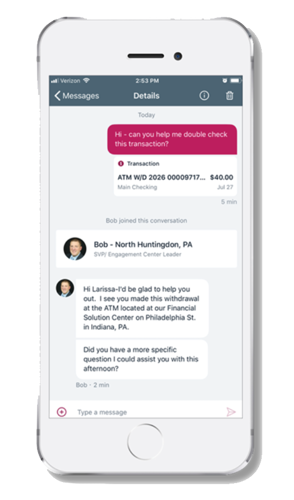
If you have a question about something you see in your online banking account, no worries. Our team is available to connect - just select "Start a Conversation." If it happens to be off hours, you can leave us a message, and we'll respond as soon as we can.
Keeping Your Banking Secure
As an extra security feature, you'll be asked where you'd like to receive a verification code during the enrollment process. You can choose via text, phone call, your favorite authenticator app or even setup a passkey. This process is called 2 Factor Authentication and will happen anytime you're using a new device or if you reset your device cookies.
Keep in mind that we will never ask you for your usernames or passwords. Visit our Fraud Center for ongoing information to keep your private information, well, private.
Frequently Asked Questions
Search for First Commonwealth Bank in the Apple App Store or Google Play and install it free. Sign in with your online banking credentials, or enroll from the app if you are new.
Yes, the app is free to download and use. Your mobile carrier's standard data or messaging rates may apply.
Yes. The app uses biometric login (Touch ID or Face ID) plus two-factor authentication, and you can lock your debit card instantly with SecurLOCK. Never share your login or verification codes.
Choose mobile deposit, enter the amount, and photograph the front and back of the endorsed check. Deposits submitted by 8 p.m. are typically available the next business day.
The app works on current Apple and Android devices that support Touch ID or Face ID.
1 We don’t charge for these services but standard message, data, and internet service provider rates may apply so check with your carriers.2 To send or receive money with Zelle®, both parties must have an eligible checking or savings account..
Zelle® and Zelle® related marks are wholly owned by Early Warning Services, LLC and are used herein under license.